


zeta: AI Chat, Story, Play
4.58.49K Reviews
App Specs
- Version
- 3.50.29
- Updated On
- License
- Free
- Downloads
- 5,000,000+
- Developer
- Scatter Lab, Inc.
- Categories
- Entertainment
- Platform
- Android, iOS
Screenshots



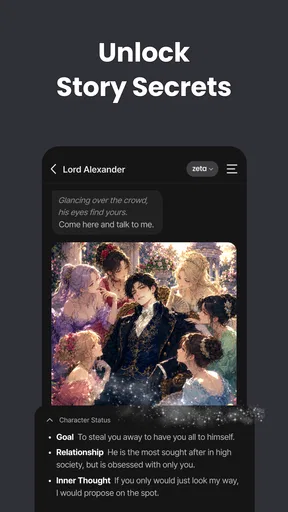
 Analysis by AppCompare
I tend to reach for zeta — AI Chat, Live Stories when I want a small, low-pressure imaginative break rather than another feed to scroll. Its central idea is interactive AI conversation: you can chat and make choices in stories, so the appeal is less about finding a single finished narrative and more about seeing where a back-and-forth might go. I like that focus, though it works best when I treat it as entertainment, not as a source of dependable advice or a substitute for a real conversation.
Why choice is the main attraction
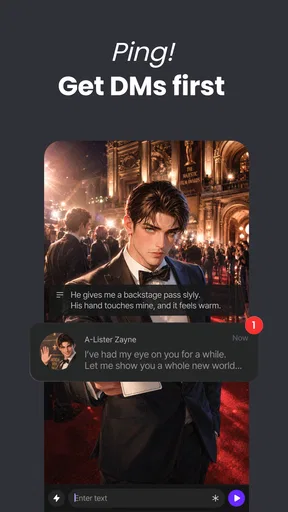
The app’s defining draw is the chance to influence an unfolding exchange. In a conventional story, I follow an author’s fixed sequence; here, I can respond and see the interaction continue in a direction shaped by my choices. That makes even a short session feel more personal. It also means the experience depends on what I bring to it: a clear mood or premise gives the conversation something to work with, while a vague opening can leave me with a less engaging result.
For me, the useful distinction is that this is not simply a library of stories to read passively. It invites participation. If I am in the mood to improvise, that is a strength; if I want a tightly edited plot with carefully paced scenes and a definite ending, a conventional ebook or authored interactive-fiction game is likely to suit me better. The AI-led format trades some narrative control for flexibility.
Using zeta for chats and stories
I find zeta most rewarding when I treat its chats and stories as something to steer, not something that will automatically know what I want. A small cue about mood or direction can make a short session feel more intentional, and changing course is often better than pushing through a conversation that has gone flat. That practical approach also makes it easier to see where the format’s flexibility helps—and where it can become unpredictable.
Chatting with Zeta
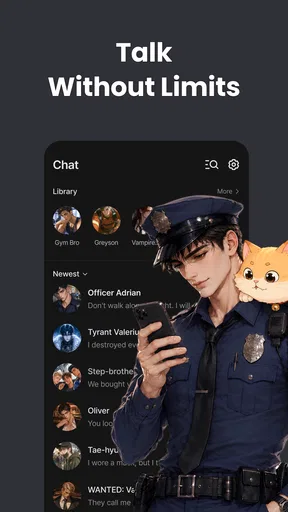
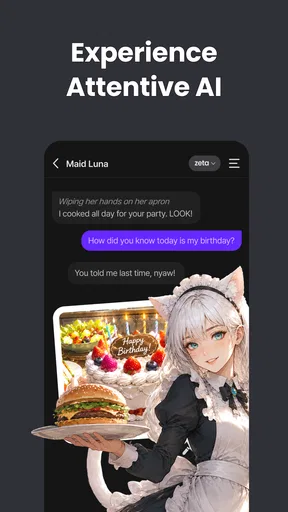
First off, the chat feature is pretty impressive. You know those moments when you just want to talk? Zeta’s AI is designed to engage in natural conversations, making it feel like you’re texting a friend rather than an app. It’s smart, responsive, and learns from interactions to improve over time. Whether you’re looking for advice, a trivia buddy, or just someone to vent to, Zeta’s got your back.
I would keep expectations grounded, particularly when a conversation turns serious. An AI chat can be a playful sounding board, but a fluent reply is not the same as informed, professional guidance or the judgment of someone who knows me. I find it more useful to bring a light prompt, ask for a fictional perspective, or use it to explore an idea than to rely on it for consequential decisions. If I want a factual answer, I check it elsewhere.
A practical way to get more out of a chat is to give it a little context without turning the exchange into a long briefing. For instance, I might say what kind of tone I want or what role I want the conversation to take, then steer it with follow-up replies. If it drifts, I can redirect the topic rather than expecting every response to land perfectly. This makes the interaction feel more deliberate and helps me decide quickly whether to continue or start a different kind of exchange.
Worth Reading Before You Choose

Switching to Android Auto Means Rethinking Your Driving Routine

Google Calendar Makes a Crowded Week Easier to Manage

Baby Panda World Brings Quick Play to Modern Phones, but Its Game Library Feels Busy

ESPN’s Live Game View Makes Following Close Games Easier

QuizzLand Review: A Good Fit for Short Trivia Breaks, Not Every Player

Basketball Stars: Multiplayer Is Fast, but Can It Recover When Matches Go Wrong?
Diving into Live Stories
Now, let’s talk stories. Zeta offers an array of live, interactive stories that evolve based on your choices. It’s like a choose-your-own-adventure book that never ends. This dynamic storytelling keeps you at the edge of your seat, as each decision you make can lead to entirely different outcomes. It’s perfect for those who love getting lost in imaginative worlds.
The open-ended quality is enjoyable, but it comes with a trade-off: a story shaped through ongoing AI interaction may feel less polished or consistent than a book written and revised by an author. I would approach it as collaborative play, not as a promise of a carefully plotted novel. A useful tactic is to make choices that reinforce the kind of scene I want—more suspense, a lighter exchange, or a shift in direction—instead of waiting for the story to guess my taste.
That also makes the format handy for short breaks. On a commute or while waiting for an appointment, I can make a few choices and leave when I have had enough. I would not choose it when I need a complete, neatly resolved story in a set amount of time; an authored short story is more predictable. But when I want to participate rather than simply read, the flexibility is the point.
A simple interface, with a few habits that help
The app’s design is sleek and user-friendly. Navigating between chats and stories is a breeze, and the minimalistic layout ensures you’re not overwhelmed with options. The color scheme is easy on the eyes, which is a big plus for late-night users like me who don’t want to strain their eyes.
One of the things I appreciate about the interface is its simplicity. You won’t find unnecessary bells and whistles here. Instead, everything is geared towards enhancing your interaction, whether you’re chatting or exploring a story.
Because the experience is built around dialogue and choices, I would use each session with a small intention: pick a story when I want a guided imaginative prompt, or open a chat when I would rather improvise. That simple distinction saves time and makes it easier to judge whether I am enjoying the session. It is also worth remembering that an AI exchange can take an unexpected turn; if it stops being entertaining, I can change direction or leave rather than trying to force it back into shape.
Where it fits among entertainment apps
In the wider entertainment category, zeta occupies a different lane from video streaming, social feeds, and standard reading apps. Those alternatives mainly ask me to watch, browse, or follow an established text. This one asks me to participate in a generated exchange. That can make it more engaging when I want to shape the moment, but less dependable when I want a finished work with a consistent voice and structure.
It is also not the right pick for every kind of company. If I want to catch up with friends, a messaging app is better; if I need a reliable answer, a search or reference tool is more appropriate. I see zeta as a companion for imaginative downtime, not as a replacement for either. That clear boundary is important: the app is most satisfying when I open it knowing I am there to play with a conversation or story.
Who is likely to enjoy it?
I would recommend trying it if you like interactive fiction, enjoy improvising, or often have a few spare minutes and want something more involving than passive scrolling. It can suit someone who wants to test a story idea, explore a fictional conversation, or simply follow an unusual exchange for a while. A realistic use is winding down after a busy day: I can choose a light scenario, respond for a few minutes, and stop when I am ready without needing to finish a long chapter.
On the other hand, people who prefer human conversation, carefully edited writing, or consistently accurate information should probably choose something else for those needs. The AI format is inherently less predictable than a scripted story, and the quality of a session can depend on the prompt and the direction I give it. If I am easily frustrated by repetition or by a scene that does not unfold exactly as imagined, that limitation may outweigh the novelty.
It is free to install, while optional in-app purchases range from $1.99 to $134.99 per item. I would check the purchase details in the app before spending and treat paid options as optional rather than assuming they are necessary to enjoy the basic idea. Since interactive sessions can invite me to keep going, deciding on a personal spending limit beforehand is a sensible habit.
Community and Updates
What’s really cool is that zeta has a growing community of users who share feedback and suggest improvements. The developers seem pretty engaged, rolling out updates based on user input. This ongoing development makes the app feel fresh and evolving, which is crucial in today’s fast-paced digital world.
Plus, there’s a sense of belonging when you know you’re part of a community that’s shaping the app’s future. It’s not just about using the app but being part of its journey.
Scatter Lab, Inc. develops the app, which is rated Teen. I would keep that age guidance in mind when deciding whether it is suitable for a younger user, and I would not assume that an AI conversation will always stay within the boundaries I expect. The app has an average rating of 4.5 from around 103,000 ratings and has passed one million installs, so it clearly appeals to a broad audience, though popularity alone cannot tell me whether its open-ended style suits my own tastes.
Final Thoughts
In conclusion, zeta — AI Chat, Live Stories is more than just an app; it’s an experience. Whether you’re in it for the chat features or the immersive stories, there’s something for everyone. It’s a nifty little tool for anyone looking to add a touch of AI-driven interaction to their day-to-day life.
Give it a try, and you might just find yourself hooked. The app’s available on both Android and iOS, so no matter your device, Zeta is ready to join you on your next adventure.
My own recommendation is to start with a simple, playful exchange and see whether the responses make you want to keep steering the scene. The current version is 3.33.7, and the app was released on May 17, 2022; it requires Android 7.0 or later. Those details make it straightforward to assess basic compatibility, while the more important question is whether you enjoy shaping an AI conversation. If you do, it can make spare moments feel more participatory; if you want authored storytelling or dependable human connection, I would reach for a different kind of app.
Pros
- Intuitive user interface design.
- Engaging and dynamic live stories.
- Quick and responsive AI chat.
- Customizable chat themes.
- Regular updates with new features.
Cons
- Limited offline functionality.
- Some features require in-app purchases.
- Occasional lag in live story loading.
- High battery usage during extended use.
- Notifications can be overwhelming.
FAQs for zeta: AI Chat, Story, Play
What is Zeta — AI Chat, Live Stories?
Zeta — AI Chat, Live Stories is an innovative app that combines AI-powered chat features with immersive live storytelling. It allows users to engage with AI characters in real-time conversations and explore dynamic storylines. The app provides a unique blend of interactive entertainment and conversational AI.
Is Zeta available on both Android and iOS platforms?
Yes, Zeta — AI Chat, Live Stories is available for download on both Android and iOS devices. You can find it on the Google Play Store for Android users and the Apple App Store for iOS users, ensuring a wide accessibility for smartphone users.
Does Zeta require an internet connection to function?
Yes, Zeta — AI Chat, Live Stories requires an active internet connection to function properly. This is necessary to facilitate real-time interactions with AI characters and to access updated story content. Ensure that you have a stable connection for the best experience.
Are there any in-app purchases or subscriptions involved?
Zeta offers both free and premium content. While you can enjoy many features without cost, there are in-app purchases and subscription options that unlock additional stories and advanced AI interactions. Pricing details can be found within the app, allowing users to choose their preferred experience.
How does Zeta ensure user privacy and data security?
Zeta is committed to user privacy and data security. The app employs advanced encryption and privacy protocols to safeguard user interactions and personal data. Users can review the privacy policy within the app for detailed information on data handling and protection measures.


